Configure the mission
Edit deployment altitude, liftoff detection, telemetry, flight-event actions, and timers.
 CATSControl & Telemetry Systems
CATS Configurator
Connect Vega over USB to configure the mission, inspect sensors, and test outputs before launch.
Edit deployment altitude, liftoff detection, telemetry, flight-event actions, and timers.
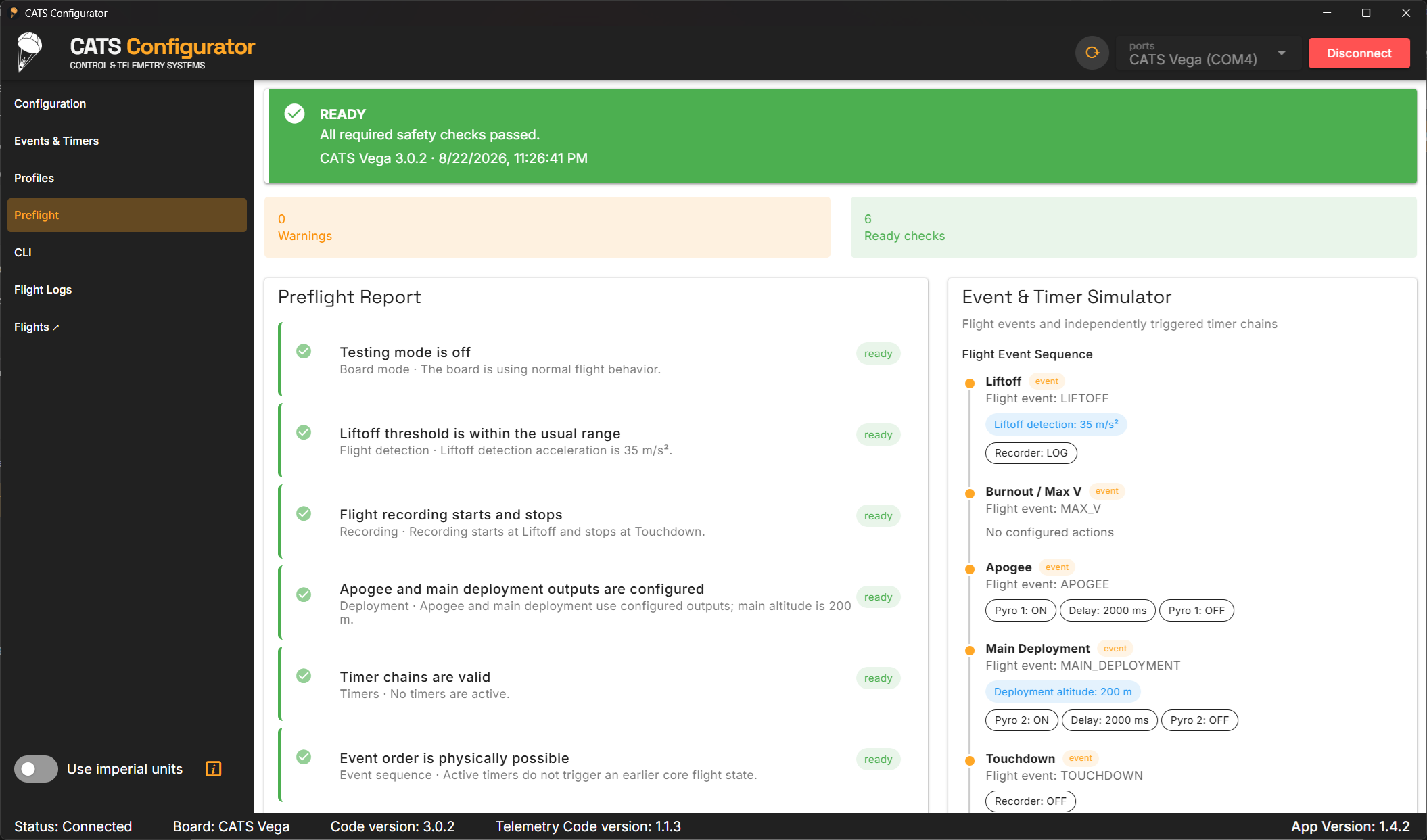
Run a guided preflight check and preview how flight events and timer chains fit together.
Browse logs on Vega, open local .cfl files, and continue the analysis in CATS Flights.
From setup to post-flight analysis
Connect Vega over USB to read its current configuration and make the mission-specific settings clear before you save them back to the board. Configure recovery events, additional actions, timers, telemetry, and the flight-data recorder without working through a command line.
The guided preflight report reads the saved setup from Vega, checks it for common problems, and lays out the expected flight-event sequence and timer chains for review. Live status and sensor values remain available while the board is connected.
After flight, browse flight logs on Vega's read-only mounted CATS drive or open a local log. You can inspect plots in Configurator or pass the file directly to CATS Flights for deeper analysis. The app is available for Windows, macOS, and Linux.